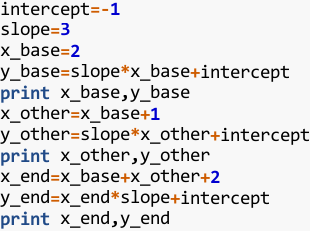
Below are the programs for the new eyeCode experiment (#2 on Mechanical Turk).
Each program type has 2-3 versions, one of which a programmer will be randomly
assigned.
You may try the experiment at experiment.synesthesiam.com.
[TOC]
---
## basketball
The `basketball` programs come from an eye-tracking experiment designed by
Teresa Busjahn (Freie Universität Berlin, Germany). The program filters a list
of heights and places those above 180 in a list called `team`. With minor
changes, we transform the original recursive program to an iterative one.
### iterative
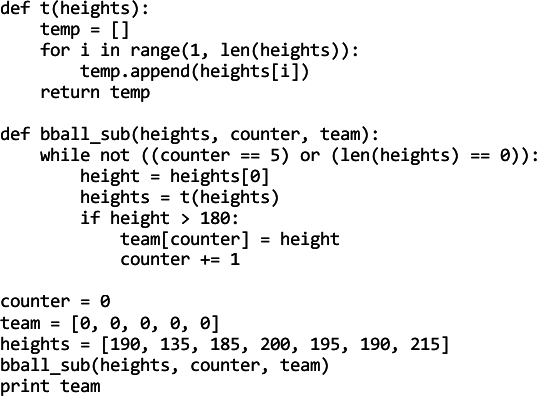
In the `iterative` version, `bball_sub` is only called once. A `while` loop
inside this method terminates once 5 heights have been examined.
From the programming education literature, we assume that recursion imposes an
additional mental burden for novices (even though the `recursive` version is
tail recursive). Thus, we expect novice programmers to take less time on this
version.
 ### iterative\_flipped
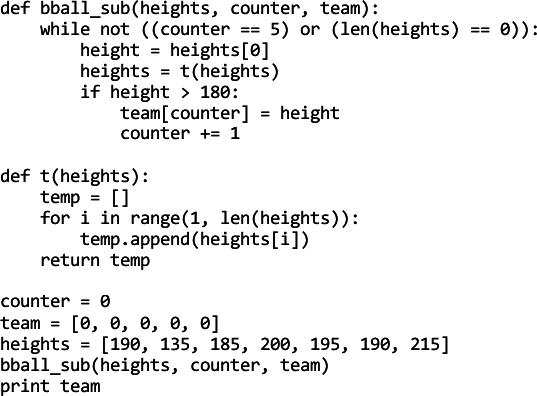
The `iterative_flipped` version is identical to 'iterative' except that the
`bball_sub` and `t` methods are defined in the opposite order. We expect to see
a difference between the two versions because programmers will be introduced to
aspects of the program in a different order (assuming they read from top to
bottom). We expect this difference to modulate response times, but error rates
could be affected as well.
### iterative\_flipped
The `iterative_flipped` version is identical to 'iterative' except that the
`bball_sub` and `t` methods are defined in the opposite order. We expect to see
a difference between the two versions because programmers will be introduced to
aspects of the program in a different order (assuming they read from top to
bottom). We expect this difference to modulate response times, but error rates
could be affected as well.
 ### recursive
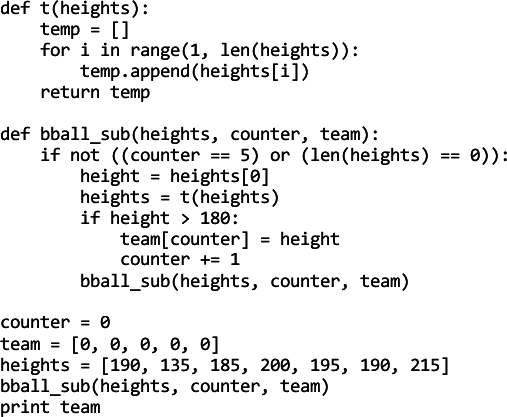
In the `recursive` version, `bball_sub` is called 5 times (4 times by itself)
to update `team` with the filtered heights. This version's output is identical
to the `iterative` version.
We expect this version to take more time for novice programmers due to the
additional mental burden imposed by recursion.
### recursive
In the `recursive` version, `bball_sub` is called 5 times (4 times by itself)
to update `team` with the filtered heights. This version's output is identical
to the `iterative` version.
We expect this version to take more time for novice programmers due to the
additional mental burden imposed by recursion.
## between
The `between` programs test the effect of inlined versus pulled-out
functionality. Both versions perform the same task: filter and intersect two
lists of integers.
### functions
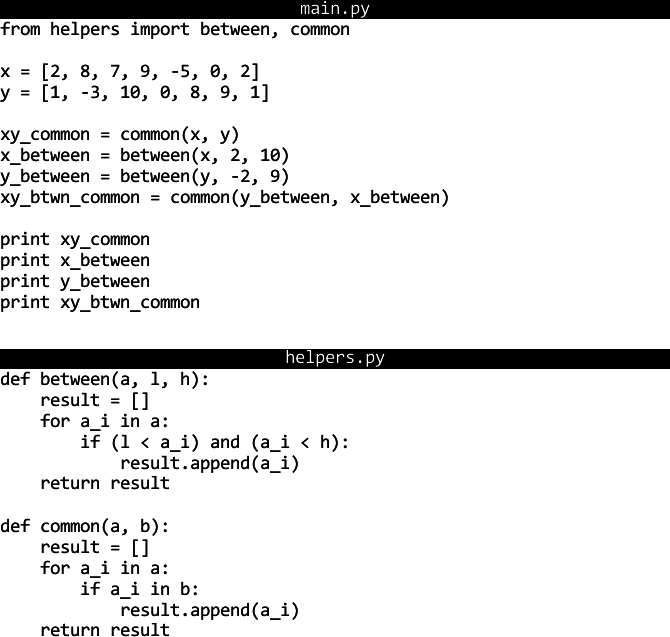
In the `functions` version, the intersection (`common`) and filtering
(`between`) operations have been pulled out into helper functions in a separate
file (`helpers.py`).
We expect this version to take less time because the necessary abstraction has
already been done (i.e., the operations have been identified and named).
 ### inline
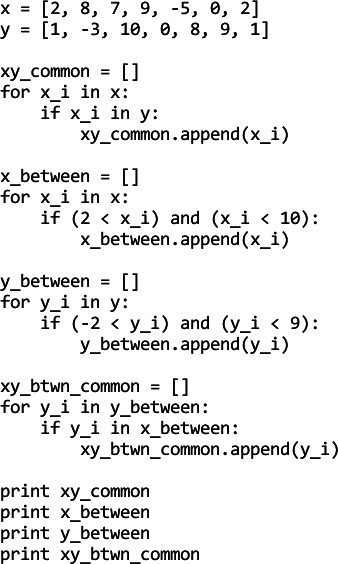
In the `inline` version, the filtering and intersection operations have been
inlined.
We expect this version to take more time because identifying the commonality
between operations must be manually identified by the programmer.
### inline
In the `inline` version, the filtering and intersection operations have been
inlined.
We expect this version to take more time because identifying the commonality
between operations must be manually identified by the programmer.
## boolean
The `boolean` programs test hypotheses about what makes boolean expressions
more or less complex. Some research suggests that mixing operators (e.g., AND,
OR) and using more parentheses is detrimental to readability.
### easy
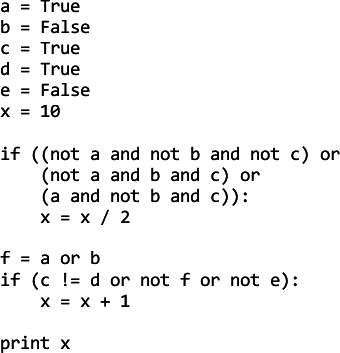
The `easy` version contains boolean expressions with fewer mixed operators and
parentheses. An intermediary variable is also used in the second expression.
We expect programmers to take less time with this version, and for novices to
make fewer errors.
 ### hard
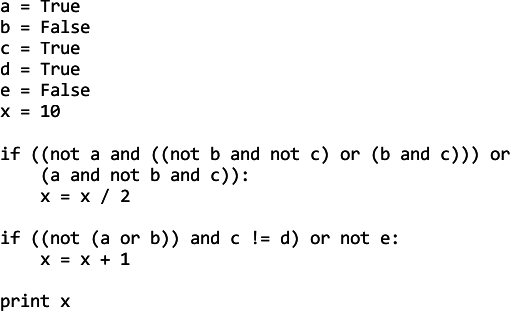
The `hard` version contains boolean expressions with with more mixed operators
and parentheses.
We expect programmers to take more time, and make more errors in this version
(especially novices).
### hard
The `hard` version contains boolean expressions with with more mixed operators
and parentheses.
We expect programmers to take more time, and make more errors in this version
(especially novices).
## counting
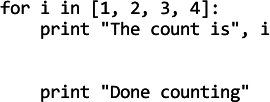
The `counting` programs test the effect of whitespace on the grouping of loop
statements. In the previous experiment, programmers were likely to assume that
the final `print` statement was not part of the loop when there were two blank
lines above it (`counting_twospaces`).
However, it was not clear if this effect was being magnified by the fact that
the words "Done counting" were in the `print` statement. In this experiment, we
retain the `counting_twospaces` version as `counting_done` and add a nearly
identical version where the `print` statement prints something nonsensical.
### done
The `done` version is identical to the `counting_twospaces` version of the
previous experiment. In that experiment, programmers were at chance when
guessing whether the final `print` statement belonged inside or outside the
loop. We expect those results to be replicated here.
 ### other
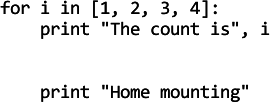
The `other` version differs from `done` only by a few letters in the final
`print` statement. We expect no difference between this and the `done` version,
but there is a chance that programmers may make fewer errors if the nonsense
words encourage them to see the `print` statement as part of the loop.
### other
The `other` version differs from `done` only by a few letters in the final
`print` statement. We expect no difference between this and the `done` version,
but there is a chance that programmers may make fewer errors if the nonsense
words encourage them to see the `print` statement as part of the loop.
## order
The `order` programs test the effect of definition/use order on programmer
efficiency. The previous experiment had a similar set of programs, but we did
not see a significant difference between the two versions, presumably because
the programs were too short. The new programs are longer and more complex,
hopefully eliciting an effect.
### inorder
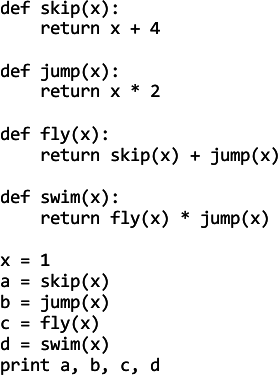
The `inorder` version defines and uses the `swim`, `jump`, `fly`, and `skip`
functions in the same order as they are called. We expect this version to take
less time because of congruence between the visual and functional layout of the
functions.
 ### shuffled
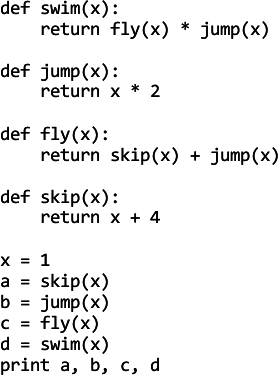
The `shuffled` version defines and uses the `swim`, `jump`, `fly`, and `skip`
functions in different orders. We expect this version to take longer because
programmers cannot make strong assumptions about the visual location of the
functions based on their use.
### shuffled
The `shuffled` version defines and uses the `swim`, `jump`, `fly`, and `skip`
functions in different orders. We expect this version to take longer because
programmers cannot make strong assumptions about the visual location of the
functions based on their use.
 ### shuffled\_colors
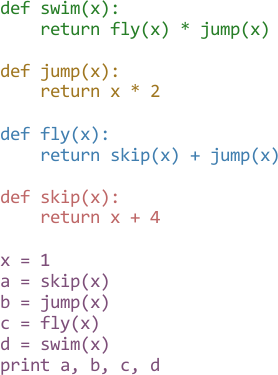
The `shuffled_colors` version is identical to `shuffled` except that each
whitespace-separated block has a different text color. We expect programmers to
be faster in this version than the original `shuffled` because the colors will
facilitate quicker visual search when locating methods. It's not known,
however, whether the hypothesized speed increase will bring them up to the
expected performance of `inorder`.
### shuffled\_colors
The `shuffled_colors` version is identical to `shuffled` except that each
whitespace-separated block has a different text color. We expect programmers to
be faster in this version than the original `shuffled` because the colors will
facilitate quicker visual search when locating methods. It's not known,
however, whether the hypothesized speed increase will bring them up to the
expected performance of `inorder`.
## nanotech
The `nanotech` programs test the effect of comments (good and bad) on program
understanding.
### comments
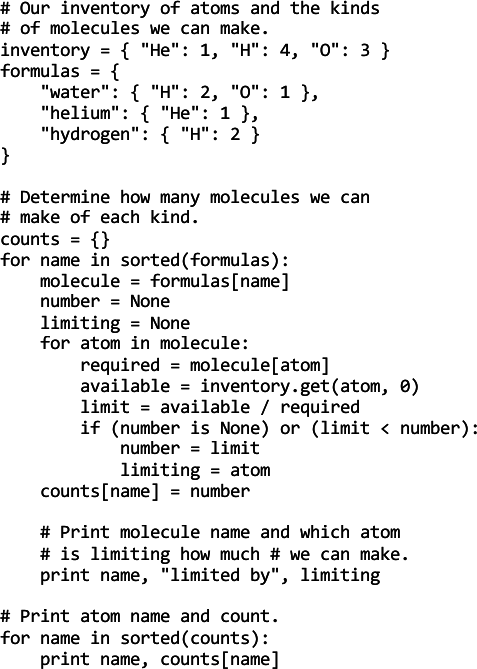
The `comments` version contains comments for each part of the program. While
the first two comments are helpful, the last one is incorrect (the molecule or
formula name is printed, not the atom). We expect novices to produce more
errors in this version because of a heavier reliance on the comments.
 ### nocomments
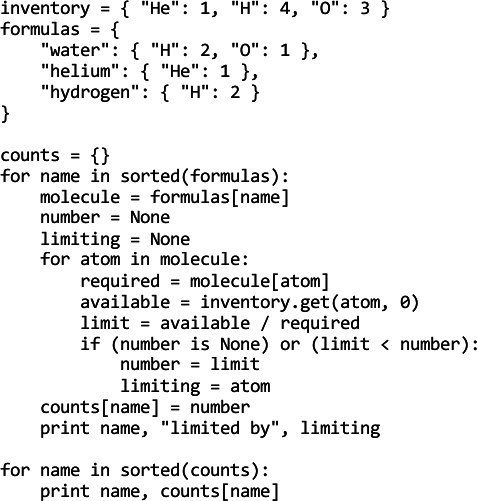
The `nocomments` version is identical to `comments` except that the comments
are removed. We expect novice programmers to perform better on this version
because they will not be led astray by the final comment.
### nocomments
The `nocomments` version is identical to `comments` except that the comments
are removed. We expect novice programmers to perform better on this version
because they will not be led astray by the final comment.
## overload
The `overload` programs test the effect of having different semantic priming
for the same operator (e.g., `+`) within a program. The previous experiment had
three versions: (`plusmixed`) numeric and string `+`, (`multimixed`) numeric
`*` and string `+`, and (`strings`) only string `+`.
While the `strings` version was found to take longer than the others, it was
not possible to know if this was due to there simply being more characters in
the output (full words were used). In this experiment, both versions of
`overload` have the same number of characters in their output.
### numbers
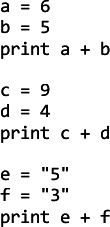
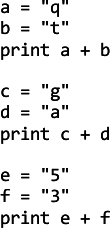
The `numbers` version primes the programmer with the numeric version of `+`,
and then ends with a string concatenation. We expect programmers to make more
errors in this version because they will be primed to think of `+` as being
addition, and accidentally compute 5 + 3 = 8.
 ### words
The `words` version only uses `+` for string concatenation. We expect
programmers to make fewer errors in this version, and to correctly predict the
final line as "53".
### words
The `words` version only uses `+` for string concatenation. We expect
programmers to make fewer errors in this version, and to correctly predict the
final line as "53".
## rectangle
The `rectangle` programs test the effect of domain knowledge on expectations.
In the previous experiment, programmers did very well on all versions of
`rectangle` despite differences in representation. In this experiment, we
introduce bugs into the code and see if long or short identifier names help in
catching them.
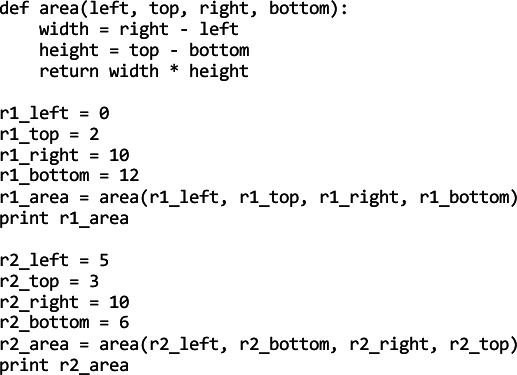
The two bugs are:
1. The `area` function mistakenly computes `height` as `top - bottom`
2. The first call to `area()` flips the order of the `top` and `bottom` arguments
### long
The `long` version uses `left`, `right`, `top`, and `bottom` for the names of
the rectangle sides in congruence with the definition of `area()`. While long
identifiers are negatively correlated with readability (Buse, 2010), we expect
them to help in catching the two bugs. Thus, programmers should make fewer
errors on this version.
 ### short
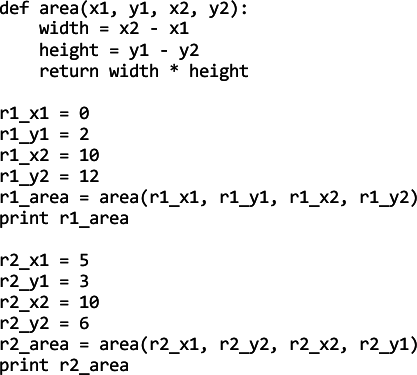
The `short` version uses `x1`, `x2`, `y1`, and `y2` for the names of the
rectangle sides. Although the identifers are shorter, this is incongruent with
the definition of `area()`. We expect programmers to make more errors in this
version; specifically, we expect them to not catch the two bugs.
### short
The `short` version uses `x1`, `x2`, `y1`, and `y2` for the names of the
rectangle sides. Although the identifers are shorter, this is incongruent with
the definition of `area()`. We expect programmers to make more errors in this
version; specifically, we expect them to not catch the two bugs.
## scope
The `scope` programs violate one of Soloway's Rules of Discourse: don't include
code that does nothing. All three versions contain two functions that do not
(and cannot) modify their integer parameter.
In the previous experiment, participants were at chance when predicting whether
the output was 4 or 22 regardless of experience.
### justreturn
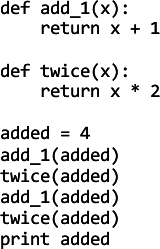
In the `justreturn` version, the `add_1` and `twice` functions do not "pretend"
to update `x`; instead, they simply return a new value.
We expect this version to have the fewest errors because programmers will more
readily see that the return values of each function call are not saved or
manipulated.
 ### noreturn
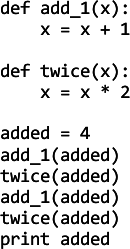
The `noreturn` version updates `x` without returning a value (closely
resembling the `diffname` version of `scope` from the previous experiment).
We expect programmers to make the most errors with this version because of (1)
the strong expectation that included code should do *something*, and (2)
without a return statement, `add_1` and `twice` can **never** do anything.
### noreturn
The `noreturn` version updates `x` without returning a value (closely
resembling the `diffname` version of `scope` from the previous experiment).
We expect programmers to make the most errors with this version because of (1)
the strong expectation that included code should do *something*, and (2)
without a return statement, `add_1` and `twice` can **never** do anything.
 ### return
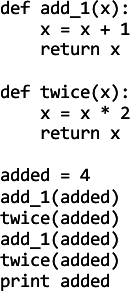
The `return` version combines the `noreturn` and `justreturn` versions by
modifying `x` and then returning its value.
We expect this version to produce similar results to `justreturn`, but it is
possible that the modification of `x` will trigger an additional expectation
that `added` has changed (despite the fact that Python is effectively
pass-by-value for non-mutable types such as `int`).
### return
The `return` version combines the `noreturn` and `justreturn` versions by
modifying `x` and then returning its value.
We expect this version to produce similar results to `justreturn`, but it is
possible that the modification of `x` will trigger an additional expectation
that `added` has changed (despite the fact that Python is effectively
pass-by-value for non-mutable types such as `int`).
## whitespace
The `whitespace` programs test the effect of horizontal and vertical whitespace
on programmer performance. In the previous experiment, we tested whether having
code aligned by operators impacted order-of-operations errors. We did not find
a significant effect, prompting a more extreme investigation.
### normal
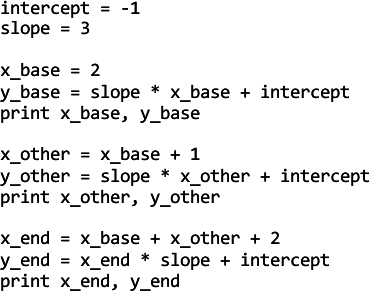
The `normal` version is spaced as most programmers would expect (though not
aligned by operator). We expect this version to take the least time and have
the fewest errors.
 ### nospace
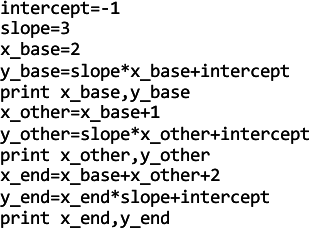
The `nospace` version is identical to `normal` except that all whitespace has
been removed (obviously not in front of the `print` keywords, though). We
expect this version to be the most difficult, taking more time and producing
more errors than `normal` or `nospace_highlight`.
### nospace
The `nospace` version is identical to `normal` except that all whitespace has
been removed (obviously not in front of the `print` keywords, though). We
expect this version to be the most difficult, taking more time and producing
more errors than `normal` or `nospace_highlight`.
 ### nospace_highlight
The `nospace_highlight` version is identical to `nospace` but includes some
light syntax highlighting of keywords, numbers, and operators. We expect this
version to be easier than `nospace` (i.e., less time and fewer errors), but it
is unknown whether the highlighting will allow programmers to achieve the same
performance as `normal`.
### nospace_highlight
The `nospace_highlight` version is identical to `nospace` but includes some
light syntax highlighting of keywords, numbers, and operators. We expect this
version to be easier than `nospace` (i.e., less time and fewer errors), but it
is unknown whether the highlighting will allow programmers to achieve the same
performance as `normal`.